

Email Security
- Home
- Email Security
Email Security for Public Entities
Stop Phishing Attacks Before They Reach the Inbox
AI-powered email security for K-12 schools, community colleges, and public agencies — detecting phishing, impersonation, ransomware, and business email compromise before your staff ever sees them.
- 350+ schools & public entities
- AI-Driven Threat Detection
- Dedicated Cybersecurity Advisor
Email Is the #1 Way Attackers Get In
45%
of public entities, including schools and local governments, reported a business email compromise incident in 2023–2024.
Source: RAND American School Leader Panel 2024

#1
human targeted attacks, including phishing and social engineering, remain the leading attack vector across public sector organizations.
Source: CIS MS-ISAC 2025

224%
increase in cyberattacks across public sector organizations, among the most targeted sectors worldwide.
Source: Zscaler ThreatLabz 2024

Every phishing email that lands in a staff inbox is an opportunity for attackers. A single click on a malicious link can hand an attacker access to your network, sensitive data, or financial systems. Modern phishing emails, many now written by AI, are nearly indistinguishable from legitimate messages. Traditional email filters built on keyword lists and known threat signatures cannot keep up.
AI powered detection changes that. Suspicious messages are identified and quarantined before they ever reach the employee inbox.
Email Security That Catches What Others Miss
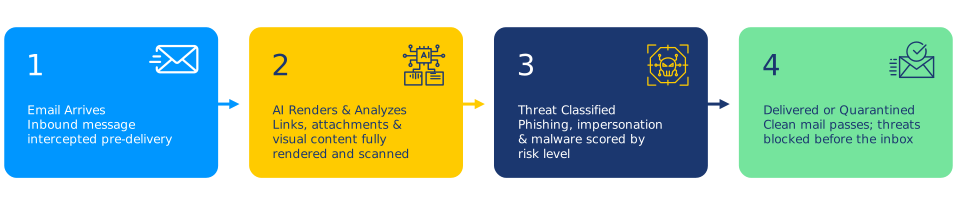
Email Security uses AI to analyze every message — not just checking it against a list of known bad senders, but understanding the intent and context of each email before it reaches your inbox. Phishing attacks designed to impersonate your superintendent, your bank, or your software vendor are caught before any staff member sees them.
Stops Phishing & Spear Phishing
Detects phishing emails including highly targeted spear phishing attempts aimed at specific staff members or administrators — including attacks that bypass traditional gateway filters.
Prevents Impersonation & BEC
Identifies emails where an attacker is posing as a trusted contact — a vendor, a colleague, or an executive — to request wire transfers, credential resets, or sensitive information.

Scans Every Attachment and Link
Every file attachment and every link is analyzed before delivery, blocking ransomware and malware before it can execute on your network.
Works With Your Existing Email
Integrates directly with Microsoft 365 and Google Workspace — no migration, no new email platform, no changes to how staff send and receive email. Works from day one.

AI-Powered
How AI Makes Your Email Protection Smarter
- Learns normal communication patterns across your organization and flags messages that deviate from expected behavior
- Detects impersonation even when the attacker's email address looks completely legitimate
- Uses behavioral AI to identify phishing intent — not just known malicious signatures
- Continuously updated with new threat intelligence as attack tactics evolve with AI-generated content
Email Security Tools
Generic email security tools were not designed for your budget, your team size, or your compliance requirements.
Simple to Manage
No tuning, no whitelists to manage, no security analyst required. Email Security learns your organization and protects automatically from day one — with no ongoing maintenance from your team.

Compliance Ready
Configured for FERPA (student data privacy), CIPA, HIPAA, and NIST CSF. Provides audit logs documenting email-borne threat attempts — formatted for compliance reviews and insurance assessments.

Lowers Your Insurance Premium
Email security is among the top controls required by cyber insurers for public entities. Documented email protection helps reduce your premium at renewal. Email security compliance documentation is prepared for your insurer.
Protection That Starts Quickly
From environment assessment to fully protected backups in three clear steps.
Simple to Start. Simpler to Run.
Three steps to protect every inbox in your organization.
01
Assessment
A review of your current email environment identifies your platform (Microsoft 365 or Google Workspace), existing protections, and your specific risk exposure.
02
Deploy Once
Email Security is integrated with your email platform remotely. Typical deployment: 1–2 business days. No migration, no changes to how staff send and receive email.
03
Protect Continuously
Every inbound email is analyzed before delivery — automatically blocking threats and flagging suspicious messages. Your team continues working normally. Threats do not get through.
What your team needs to do:
approximately 1 hour for initial configuration coordination.
Ready to Protect Your Organization?
Schedule a free assessment — a Cybersecurity Advisor will map ResoluteGuard Email Security to your specific environment and walk you through your options.
- A Cybersecurity Advisor responds within 1 business day
- Built exclusively for schools and public entities
- ✓ Pricing built for public entity budgets and funding cycles — transparent, with no hidden costs.
Prefer to call? Reach us directly:
888-728-6030 cyberadvisor@resoluteguard.com
Request a Free Assessment
No spam. No obligation. A real Cybersecurity Advisor will reach out — not a sales bot.
Multi-Factor Authentication
Add a second verification layer to every login — so stolen passwords can never become successful breaches.
Endpoint Security
Stop threats at every device before they spread across your network — 24/7 AI-powered protection.
Cyber Awareness Training
Train your staff to recognize phishing and social engineering before they click.
Common Questions
Everything you need to know about email security for schools and public agencies.
How is this different from the spam filter already in Microsoft 365 or Google Workspace?
Built-in filters catch obvious spam and known malicious senders but rely on signature lists and simple rules. AI-powered email security analyzes the intent and context of every message — detecting sophisticated phishing, impersonation, and business email compromise that built-in filters routinely miss.
Can it protect against AI-generated phishing emails?
Yes. AI-generated phishing emails are grammatically correct and contextually convincing — traditional filters cannot detect them. Behavioral AI analyzes communication patterns and intent rather than looking for spelling errors or known phrases, making it effective against AI-crafted attacks.
What happens to emails that are blocked?
Blocked emails are quarantined, not deleted. Administrators can review and release quarantined messages if needed. Users can be configured to receive digest notifications of quarantined emails at a frequency that suits your organization.
How long does setup take and what does our team need to do?
Typical deployment takes 1–2 business days. Your team needs approximately 1 hour for initial configuration coordination. There is no email migration and no changes to how staff send or receive email.
Does it work with our existing email platform?
Yes. Email Security integrates directly with Microsoft 365 and Google Workspace — the two platforms used by the vast majority of K-12 schools and public agencies. No new email platform or migration is required.
Will it slow down email delivery?
No. Analysis happens in milliseconds before delivery. In practice, the delay is imperceptible — staff receive their email at normal speed.
Will this help lower our cyber insurance premium?
Yes. Documented email security controls are among the top requirements for cyber insurers serving schools and public agencies. Email security compliance documentation is prepared for your insurer.
Which compliance frameworks does this support?
Email security is configured to align with FERPA (student data privacy), CIPA, HIPAA (applicable to health-related communications), and NIST CSF. Audit logs are maintained automatically and formatted for state compliance reviewers and insurance assessors.
Have a question that isn’t answered here?