Home / Remote Monitoring and Management
Remote Monitoring and Management

Keep Every Device, Network, and System Running - Before Problems Hit

Proactive monitoring, automated patching, and remote support that keep your technology working – without waiting for something to break.

When Every Device Isn't Monitored, Attackers Find the Gaps

Most school and agency IT teams are stretched thin – monitoring hundreds of devices, managing software updates, and responding to issues with little visibility into what’s happening until something fails.

70%

of K-12 IT leaders say their teams are understaffed for the devices they support.

Source: CoSN Annual IT Leadership Survey 2025

The result: deferred patches, missed alerts, and devices that quietly become vulnerabilities.
60%

of cyber compromises exploit unpatched vulnerabilities.

Source: Ponemon Institute / IBM Cost of a Data Breach 2024

Delayed updates are one of the most common entry points attackers use against schools and public agencies.
40,000+

CVEs published in 2024 - a 38% increase year over year.

Source: NIST National Vulnerability Database 2024

The volume of new vulnerabilities makes manual patch tracking impossible for any lean IT team.
Most school and agency IT teams are stretched thin – monitoring hundreds of devices, managing software updates, and responding to issues with little visibility into what’s happening until something fails. Every unpatched device is an open door for attackers.

24/7 Visibility and Control Across Your Entire Environment

Every device, server, and network component – monitored continuously, patched automatically, and supported remotely.

Continuous Endpoint Monitoring

Every workstation, laptop, tablet, and server is visible on a single dashboard - with real-time alerts when performance, storage, or security indicators fall outside normal ranges. Issues surface before they disrupt classrooms or operations.

Automated Patch Management

Operating system updates and third-party application patches are deployed automatically on a schedule - closing vulnerabilities before attackers can exploit them. No manual coordination, no disruption to instruction.

Remote Troubleshooting and Help Desk

Technical issues are diagnosed and resolved remotely - eliminating most onsite service calls and getting staff and students back to work faster. Complex issues are escalated and tracked through a structured help desk system.
Asset Inventory and Lifecycle Tracking

A complete, always-current inventory of every device in your environment - including hardware specs, software installations, warranty status, and age. Simplifies budget planning, grant reporting, and compliance documentation.
AI-Powered Detection

Intelligent Monitoring, Powered by AI

AI-assisted monitoring catches issues earlier, predicts failures before they happen, and reduces noise so IT staff can focus on what matters.

Built for Lean IT Teams. Managed for You.

Generic monitoring tools were designed for large corporate IT departments. ResoluteGuard RMM is built for schools and public agencies managing hundreds of devices with a staff of one or two.

Built for Lean IT Teams

Most schools and public agencies operate with one or two IT staff supporting hundreds of devices and users. The monitoring and management platform extends that team's reach - automating routine maintenance, surfacing the right alerts, and handling remote support so staff can focus on strategic priorities.

Lower Your Insurance Costs

Cyber insurers increasingly require documented patch management and endpoint visibility programs. Remote monitoring and management compliance documentation is prepared for your insurer.
Compliance Without Extra Work

The platform generates audit-ready reports on patch status, device inventory, and security posture - aligned with FERPA, HIPAA, CJIS, and NIST standards. Documentation is available for board presentations, state reviews, and insurance assessors.
FERPA
HIPAA
CJIS
NIST CSF
NIST 800-171

Full Coverage in Days - Not Weeks

A structured onboarding that gets monitoring, patching, and support running quickly.

01

Discover and Assess

A discovery scan identifies every device, server, and network component in your environment. Within days, your organization has a complete asset inventory and a clear view of patch gaps, outdated software, and monitoring blind spots.

02

Deploy and Configure

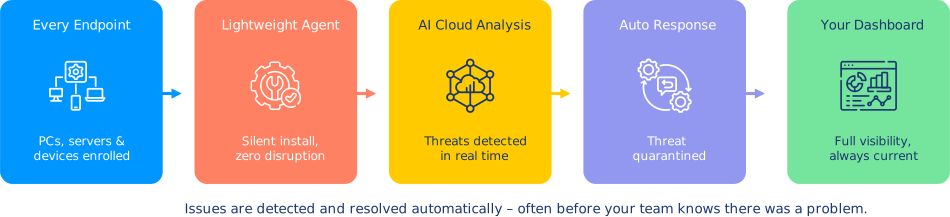
Lightweight monitoring agents are deployed across your environment. Alert thresholds, patch schedules, and escalation paths are configured to match your organization's needs. Your first automated patch cycle runs within the first week.

03

Monitor Continuously

Every device is monitored around the clock. Patches deploy automatically on schedule. Alerts surface issues before they become outages. Help desk requests are handled remotely - keeping classrooms and offices operational without waiting for an onsite visit.

Ready to Protect Your Organization?

Schedule a free assessment – a Cybersecurity Advisor will review your environment and walk you through your monitoring and management options at no cost.

Prefer to call? Reach us directly:
888-728-6030 cyberadvisor@resoluteguard.com

Request a Free Assessment

No spam. No obligation. A real Cybersecurity Advisor will reach out — not a sales bot.

You may also be interested in

Endpoint Security

AI powered protection on every device to help stop ransomware and zero day threats before they spread.
Backup & Recovery

Automated, encrypted backups with fast recovery - so a ransomware attack never means permanent data loss.
SIEM & Log Management

Continuous monitoring and alerting across your entire network - detect threats in real time.

Common Questions About RMM

Everything you need to know before you get started – from how the technology works to what your team actually has to do.

What does remote monitoring and management actually do?
RMM provides continuous visibility into every device, server, and network component in your environment. It automatically detects performance issues, security vulnerabilities, and hardware failures – then alerts your support team or resolves issues automatically before they disrupt operations.
No – it extends what your IT team can do. Instead of manually checking devices, chasing down updates, and responding to one issue at a time, your team has a single dashboard showing everything in real time. Routine maintenance is automated, so staff can focus on higher-value work.
The platform supports Windows and macOS workstations, laptops, tablets, servers, network switches and routers, printers, and other managed network devices. A full device inventory is conducted during assessment.
 
Patch schedules are configured based on your environment and maintenance windows. Operating system updates and third-party application patches are deployed automatically – including critical security patches as soon as they are available. A report of all patch activity is generated for every cycle.
 
 
Critical CVEs are flagged immediately. Patches for high-severity vulnerabilities are prioritized and deployed on an accelerated schedule – ahead of the standard patch cycle – to close gaps before attackers can exploit them.
 
 
Yes. Unusual process activity, unexpected network connections, and rapid file system changes – all common indicators of ransomware – trigger immediate alerts. Early detection significantly limits the damage and recovery time of a potential incident.
 
 
Yes. Documented patch management and endpoint monitoring are among the most commonly required controls in cyber insurance applications for schools and public agencies. Remote monitoring and management compliance documentation is prepared for your insurer.
 
 
Audit-ready reports include patch status by device and severity, complete asset inventory with software versions, uptime and availability history, and security alert logs. Reports are formatted for state compliance reviews, board presentations, and insurance assessors.


Have a question that isn’t answered here?